
SMS Invite Consent
How LetsGo handles text message invitations
How It Works
- A LetsGo user signs into the app and navigates to the Find Your Friends page.
- The user taps Import Contacts and selects specific contacts from their phone.
- The user reviews the selected contacts and explicitly taps Send Invites.
- Each selected contact receives a single, one-time SMS inviting them to join LetsGo.
User Consent
- The sending user explicitly chooses which contacts to invite. No messages are sent automatically.
- Before sending, the user sees a confirmation screen showing exactly who will receive a text.
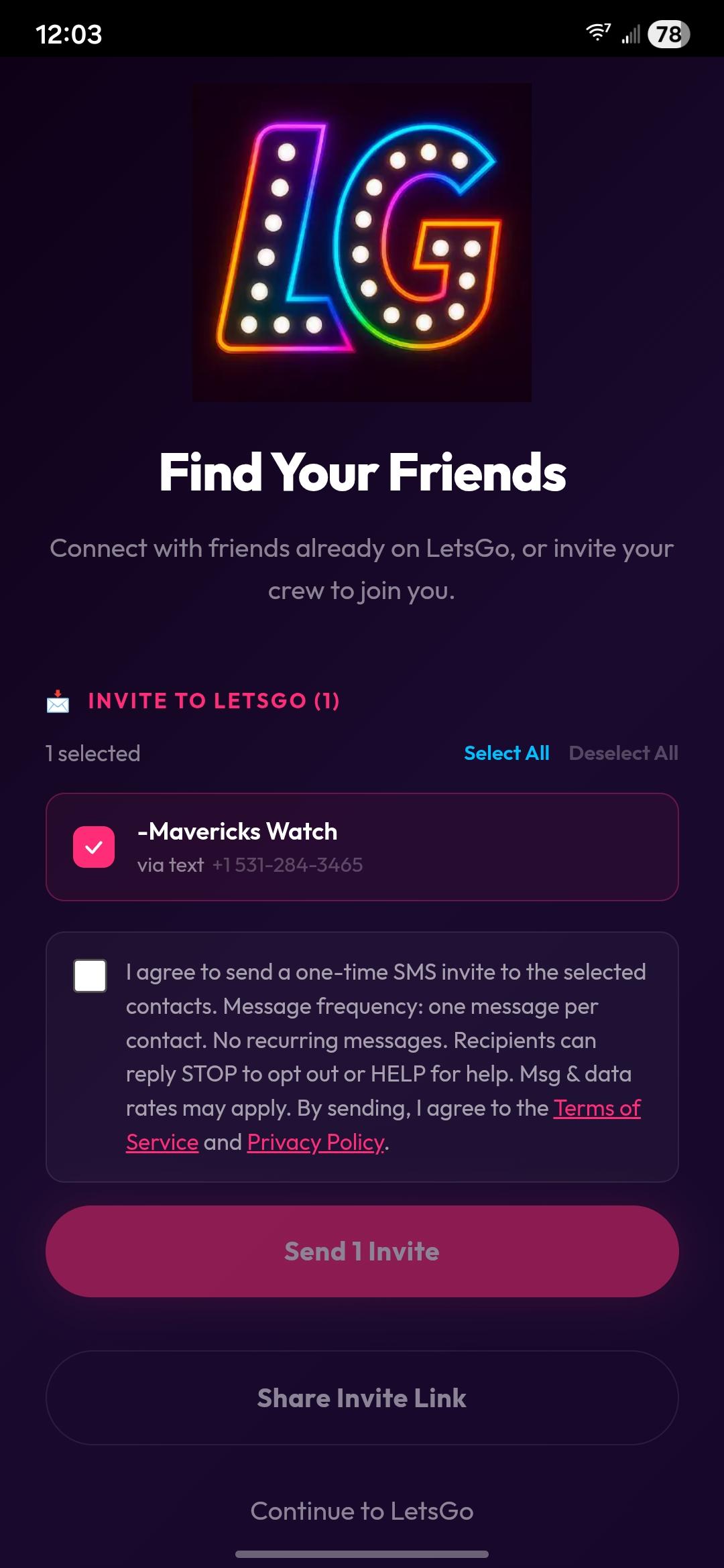
- Before sending, the user must check a consent checkbox that reads: “I agree to send a one-time SMS invite to the selected contacts. Message frequency: one message per contact. No recurring messages. Recipients can reply STOP to opt out or HELP for help. Msg & data rates may apply. By sending, I agree to the Terms of Service and Privacy Policy.”
- The “Send Invites” button is disabled until the checkbox is checked.
Consent Checkbox Screenshot
Below is a screenshot of the actual opt-in consent checkbox as it appears in the LetsGo app. The checkbox is unchecked by default and the “Send Invites” button is disabled until the user manually checks it.
Message Details
- Frequency: One message per recipient. No recurring or promotional messages are sent.
- Content: A brief invitation with a link to join LetsGo.
- Opt-out: Recipients can reply STOP at any time to opt out of future messages.
- Help: Recipients can reply HELP for support information.
- Message and data rates may apply.
Sample Message
“Alex Morgan invited you to join LetsGo — discover restaurants, earn rewards, and play games with friends! Sign up here: https://www.useletsgo.com/welcome Reply STOP to opt out or HELP for help. Msg & data rates may apply.”
Links
© 2026 LetsGo · Olson Creations LLC